Security
1. Introduction
InAppStory is a cloud SaaS platform for creating, managing, and delivering interactive content to mobile and web applications.
The platform allows companies to build:
- interactive stories (Stories);
- in-app messages;
- smart banners;
- game mechanics;
- polls, quizzes, and other interactive elements;
- personalized user scenarios.
Security is one of the core principles behind the design and operation of InAppStory. We apply organizational and technical measures to protect customer data, ensure service availability, and prevent unauthorized access.
2. Security Architecture
2.1. Overall Architecture
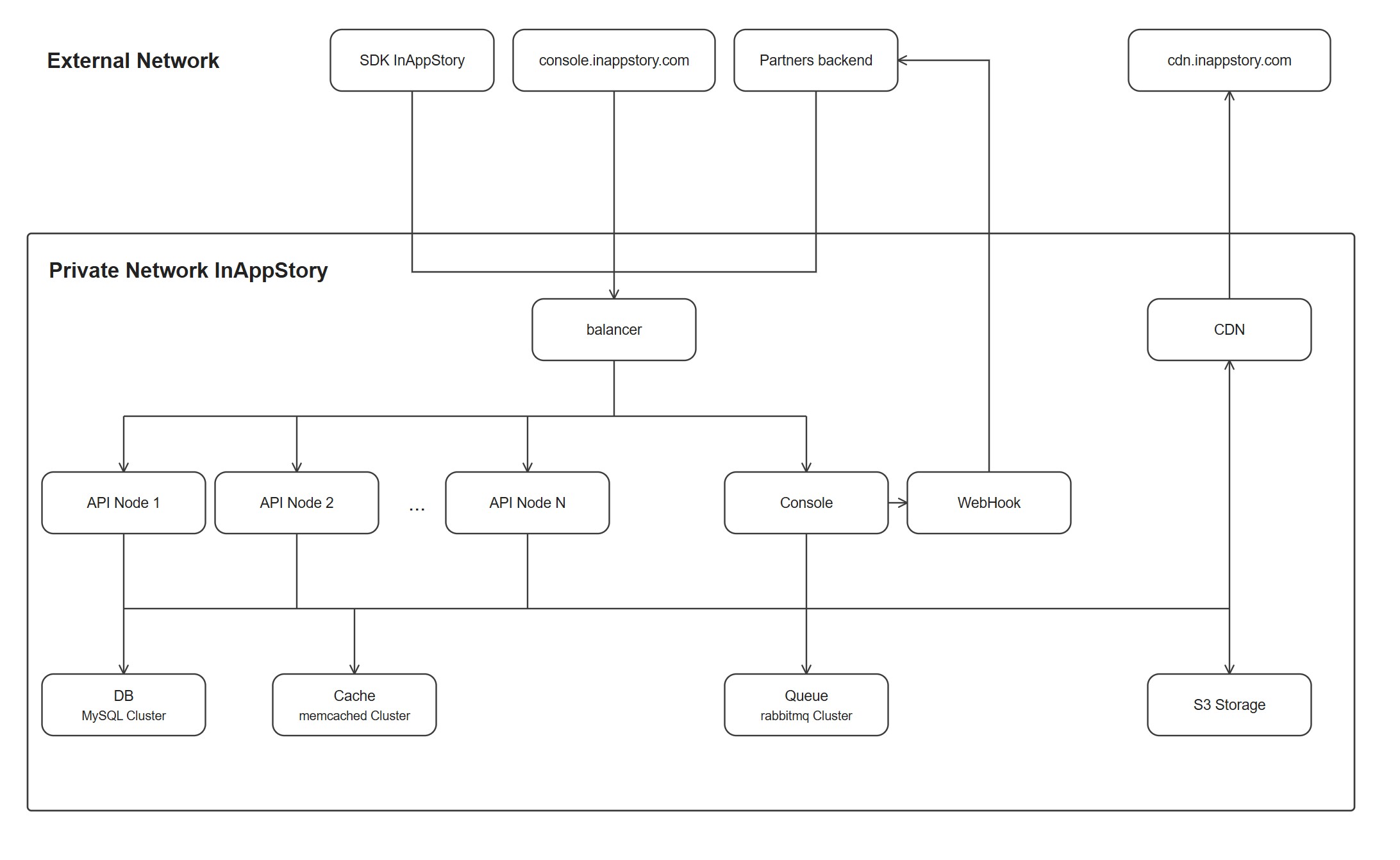
InAppStory is built as a SaaS platform with a clear separation of components. Public traffic from the SDK, the management console, and partner backends reaches the platform through a balancer; internal components — API nodes, the console, the database cluster, cache, and the message queue — run inside a private network that is not directly reachable from the internet. Media content is served separately through a CDN backed by S3-compatible storage.
2.2. Core Components
Management Console — user interface for the administrative console, content management, and day-to-day work of customer users with the platform.
Backend — business logic, user management, content management, API interactions, and processing of customer requests.
Database — stores account settings, content configurations, metadata, and platform management data.
Cache Layer — improves performance and reduces load on the primary data store.
SDK — available for Java/Kotlin, Objective-C/Swift, Dart, and TypeScript. Used for integration into mobile applications and websites, content rendering, and analytics collection.
2.3. Data Flow Between the Client App, the SDK, and the InAppStory Platform
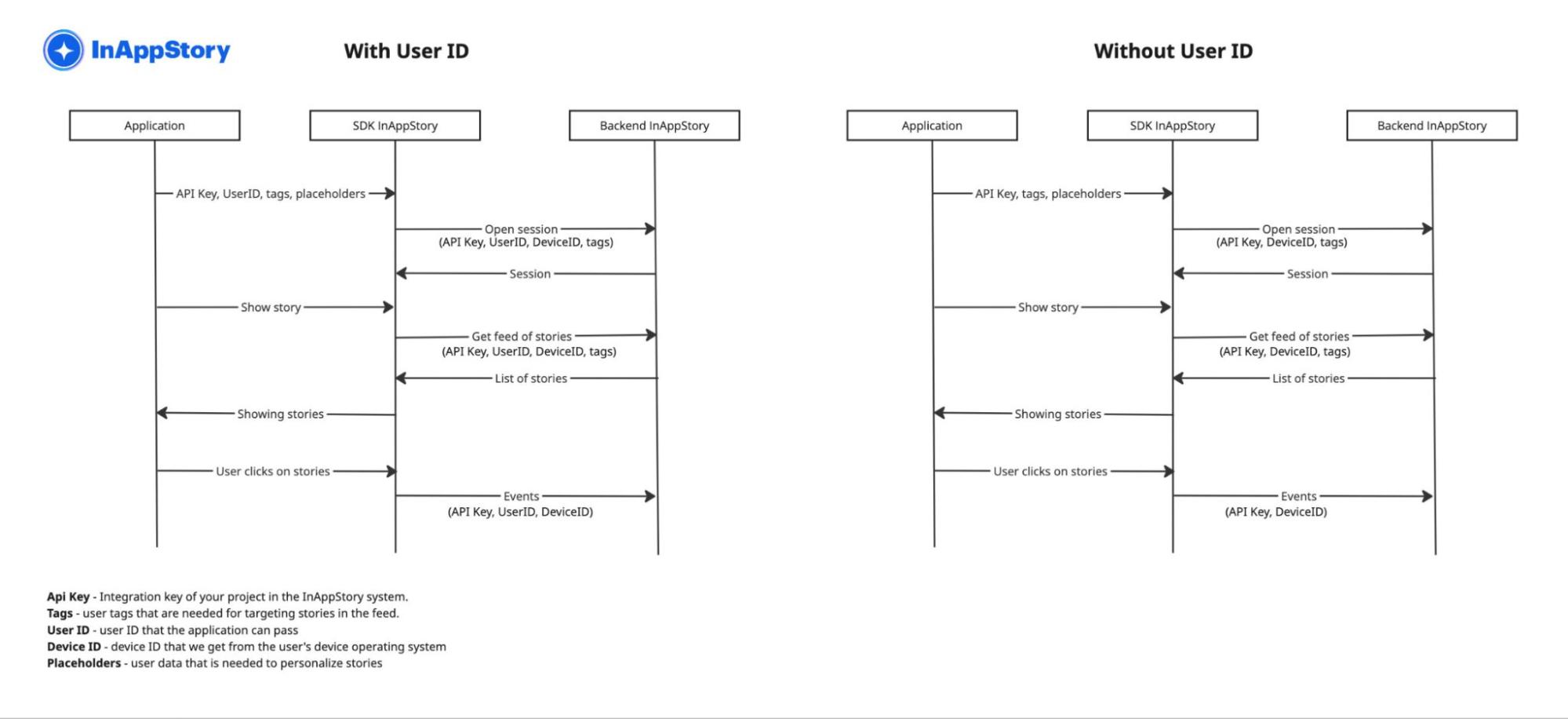
Data sent from the partner application to the InAppStory SDK:
- API Key — the project's integration key in the InAppStory platform;
- Tags — user tags required for content targeting;
- User ID — the user ID passed by the partner application;
- Device ID — the device ID obtained from the OS;
- Placeholders — user data required for personalization;
- Technical data — application version, SDK version.
Data the InAppStory SDK receives from the platform:
- configuration;
- content to display.
Events sent from the SDK to the platform:
- view;
- open;
- transition/click-through;
- interaction with elements;
- scenario completion.
Data that is never sent to the InAppStory platform:
- Placeholders — these remain on the device and are used only for local personalization of content, whether or not a
User IDis passed.
3. Infrastructure & Network Security
3.1. Server Infrastructure
InAppStory runs on virtual servers within Linux-based infrastructure.
Core protection measures:
- restriction of network access;
- management of administrative access;
- regular updates of system components;
- change control across the infrastructure;
- separation of operational and customer-facing access.
3.2. Network Security
The following measures are applied:
- firewalling;
- restriction of open ports;
- protected administrative access;
- access control for internal services.
Internal platform components are not directly accessible from the public network.
4. Data Transmission Protection (TLS)
4.1. Connection Encryption
All external connections to the platform are made over the secure HTTPS protocol.
The following are used:
- TLS 1.2 and above;
- modern cryptographic algorithms;
- certificates issued by trusted certificate authorities.
Unencrypted HTTP access is restricted.
4.2. API Protection
The InAppStory API uses:
- HTTPS;
- request authentication;
- access rights control;
- input data validation.
5. Access Management
5.1. Principle of Least Privilege
Access is granted only to employees who need it to perform their job duties.
The following are used:
- role-based access control (RBAC);
- separation of administrative and user roles;
- access control for critical systems.
5.2. User Management
The platform supports:
- individual user accounts;
- role management;
- restriction of access to specific functions;
- control over user operations.
5.3. Credential Protection
Passwords:
- are never stored in plain text;
- are stored using secure hashing;
- are protected against disclosure.
6. Backup and Recovery
6.1. Backup Procedures
Backups are performed for critical data, including:
- platform data;
- configurations;
- critical system components.
6.2. Backup Protection
Backups:
- have restricted access;
- are stored separately from the primary environment;
- are used exclusively for recovery purposes.
6.3. Recovery Verification
The recovery process is periodically tested to confirm that service functionality can be restored.
7. Secure Software Development Lifecycle (Secure SDLC)
7.1. Security Across the Development Lifecycle
Security is taken into account at every stage of development:
- Requirements — gathering functional and non-functional requirements.
- Design — describing usage scenarios, identifying edge cases, breaking work down into tasks.
- Development — following best practices and complying with internal standards.
- Code Review — automated checks with linters and SAST/DAST analyzers, plus manual review by release engineers.
- Testing — automated unit/e2e tests and manual verification by QA specialists.
- Release — automated deployment.
- Operations — monitoring and alerting.
7.2. Development Practices
The following are used:
- source code version control;
- code review;
- dependency management;
- change control;
- remediation of identified security issues.
7.3. Protection Against Common Vulnerabilities
Development takes into account the following recommendations:
- OWASP Top 10;
- secure handling of user input;
- protection against SQL injection;
- protection against XSS;
- access control;
- secure session management.
8. Vulnerability Management
The process includes:
- identification of potential vulnerabilities;
- severity assessment;
- prioritization of fixes;
- release of updates;
- tracking remediation.
Critical vulnerabilities are handled with priority.
9. Customer Data Processing
9.1. Data Processing Principles
InAppStory follows the principles of:
- data minimization;
- access restriction;
- confidentiality protection;
- using data only for stated purposes.
9.2. Personal Data
Personal data of end users is not collected or processed.
9.3. Customer Data Isolation
Access to customer data is restricted through:
- authorization mechanisms;
- separation of access rights;
- operation control.
10. Shared Responsibility
10.1. InAppStory Responsibilities
InAppStory is responsible for:
- security of its own platform;
- infrastructure protection;
- vulnerability remediation;
- managing employee access;
- ensuring service availability.
10.2. Customer Responsibilities
The customer is responsible for:
- security of their own user accounts;
- managing access for their own employees;
- correctness of the content they publish;
- compliance with applicable law when processing their own data.
11. Security Incident Notification
When a security event that may significantly affect customers is identified:
- the situation is analyzed;
- the scope of impact is determined;
- remediation measures are taken;
- affected customers are notified where necessary.
12. Security Contact
For security-related questions: support@inappstory.com
Conclusion
InAppStory applies a combination of organizational and technical security measures to protect customer data and ensure the reliable operation of the SaaS platform.
We continuously improve our security processes, including our Secure SDLC, vulnerability management, and the transparency of our information security practices.