Gathering Statistics
InAppStory offers a variety of methods for collecting and processing statistical data.
By Days
To collect general statistics, follow these steps:
- Go to the Stats section in the left menu of the InAppStory console.
- Select By Days.
- Choose the desired time period, platform, and uniqueness.
- Click Export and select the file type (XLSX, CSV).
- The report will be downloaded in your browser window.
By Stories
"By Stories" statistics can be collected in the same way as "By Days" but in the "By Stories" section of Stats.
By Users
It is possible to collect user interactions with a particular story. Follow these steps:
- Go to the Stats section in the left menu of the InAppStory console.
- Select By Stories.
- Choose the desired story.
- Click Export and under the "By User" section, click CSV.
- Click Create a New Report in the newly appeared window.
- Wait until the report status becomes Successful and download it.
Attention!
4th step is possible only with single story statistics.
By Widgets
You can collect widget interaction data. Each widget collects its own set of data, so you will have to collect this data individually from each widget if you didn't automate this process.
To learn how to make automations for statistics, click here.
To download widget statistics, follow these steps:
- Go to the Stats section in the left menu of the InAppStory console;
- Select By stories;
- Pick a desired story;
- Pick the Widget view;

- Pick a desired widget and press Download;
- Press Create a new report in the newly appeared window;
- Wait until the report status becomes Successful and download it.
Encoding issues
You may encounter encoding issues if your device uses other encoding systems.
To resolve this issue, follow this guide.
Automation
There are some ways to automate the creation of stat reports with the use of InAppStory API methods and in-app events. They allow you to create stat reports programmatically and to collect data.
REST API
InAppStory REST API has a number of methods for collecting statistics.
- Collect summary stats for a story;
- Collect stats by days for a story;
- Get a list of already generated reports for a story;
- Generate a new report for the story;
- View the status of a report by its ID;
- Get a list of already generated reports for a widget;
- Generate a new report for the widget;
- View the status of a report by its ID.
You can use these methods to configure your own statistics collection.
Using InAppStory REST API has a number of restrictions and is considered to be a slower method among the two. The main restriction being the necessity to download statistic reports in the .csv format. We recommend using the next method as it allows great flexibility and requires less time and effort in development.
In-app events
With the use of in-app events, you can collect statistics in real time, allowing you to customize statistics gathering fully to your taste. To use this functionality you will need to use events programmatically.
This method is more preferable than all of the above as it gives an opportunity to fine-tune the needed data, the time and place of data collection, and the method itself is the most customizable among others.
Once you subscribe to events, every time that event is fired, you will have access to information about the event that occurred (shown story id, tags, slide info, game info, pushed button data and more).
The partner will presumably collect and then push the data to some external data storage. The application is expected to convert the received data to the correct storage format.
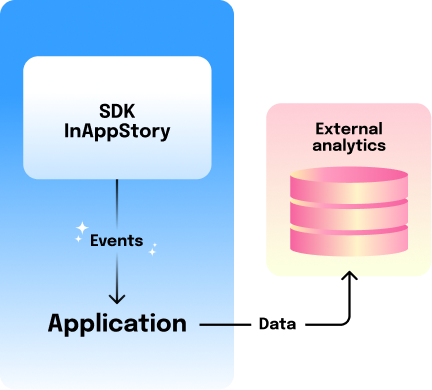
Here are the guides for each platform on how to implement this functionality in your code: